wajib coba

Friday, 13 January 2017

Silent Facebook & Messenger Server Update Brings Fast Draining Battery with High Temperatures

Many Android users woke up on January 10 to discover that their phone's performance took a nosedive overnight. Battery life is draining fast, overall performance has been sluggish, and devices seem to be overheating for no apparent reason. Not to worry, this isn't happening because of something you did.
All of these issues seem to be originating from a server-side update to Facebook and Facebook Messenger that occurred silently in the background. It doesn't matter if you actually use the apps or not, they're both constantly running and putting a massive strain on your CPU by forcing it to stay on higher frequencies.
UPDATE: David Marcus from the Facebook Messenger team claimed on January 11 that the server-side issue has been corrected. He stated that restarting the apps should prevent Facebook and Messenger from behaving the way they have been since January 10. Let us know if this works for you, and read on for more information regarding the issues Android users have been facing.

Yes, It Really Is Facebook & Facebook Messenger

Believe it or not, Facebook and Facebook Messenger are the main culprits behind this whole mess. The apps themselves haven't been updated since mid-December, so it appears that Facebook remotely flipped a switch on some behind-the-scenes feature or update that's causing all of these issues.
Not only is the update forcing your phone to stay on the higher frequencies (above sixty percent load in most reports), but the heat being generated is also preventing your phone from fast-charging. And as with any electronic device, heat represents wasted electricity, so that accounts for the terrible battery drain.
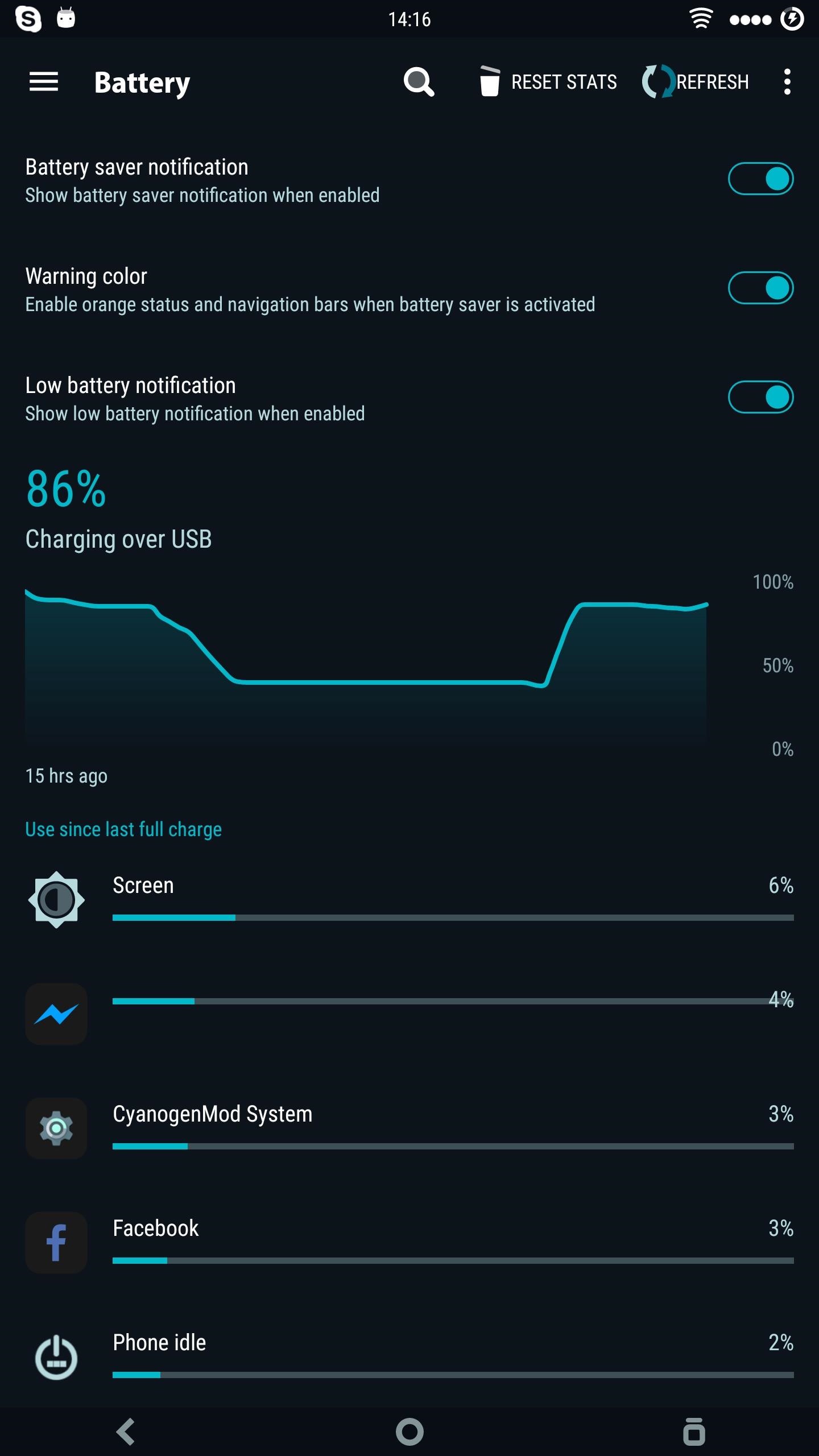
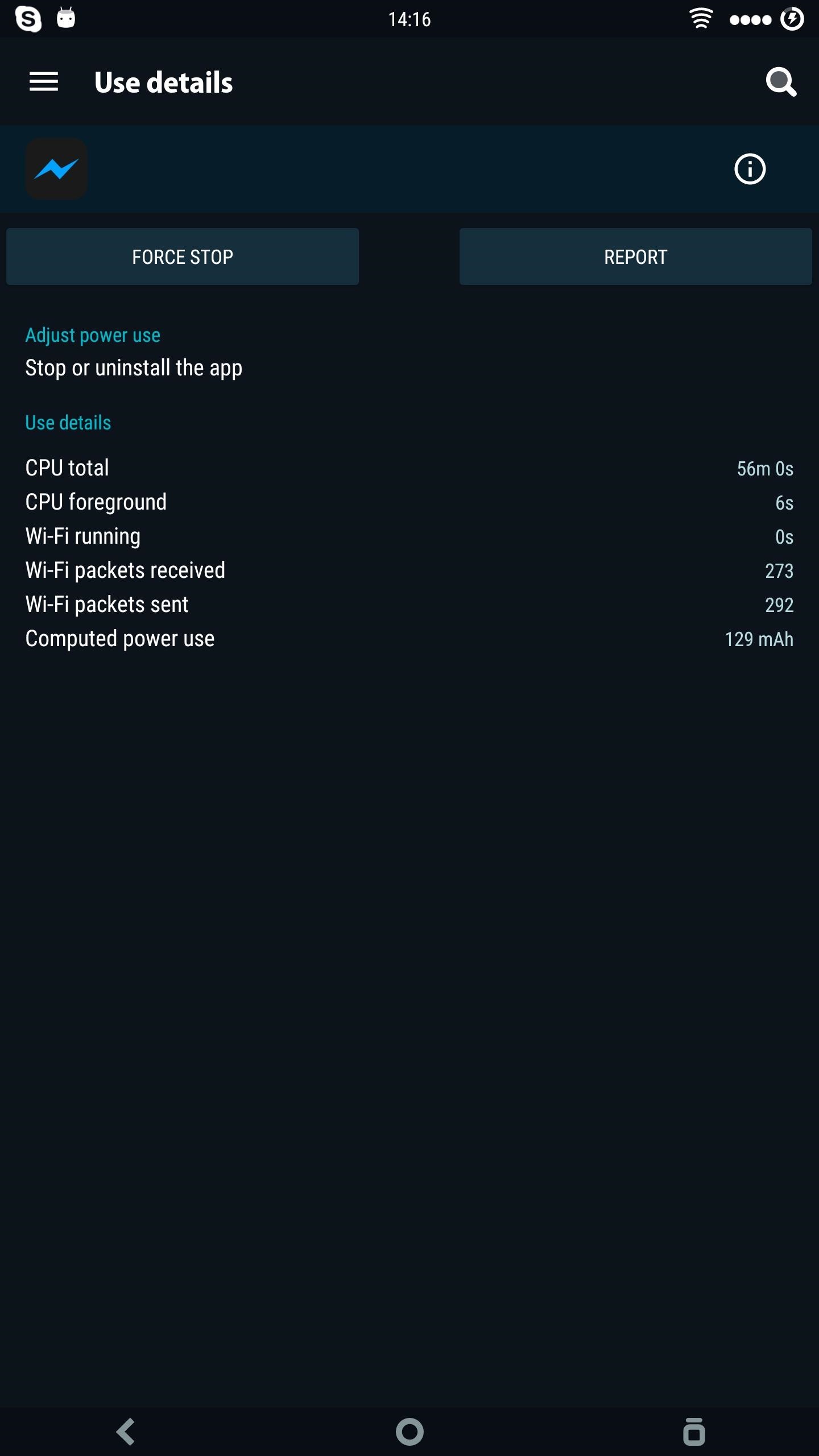
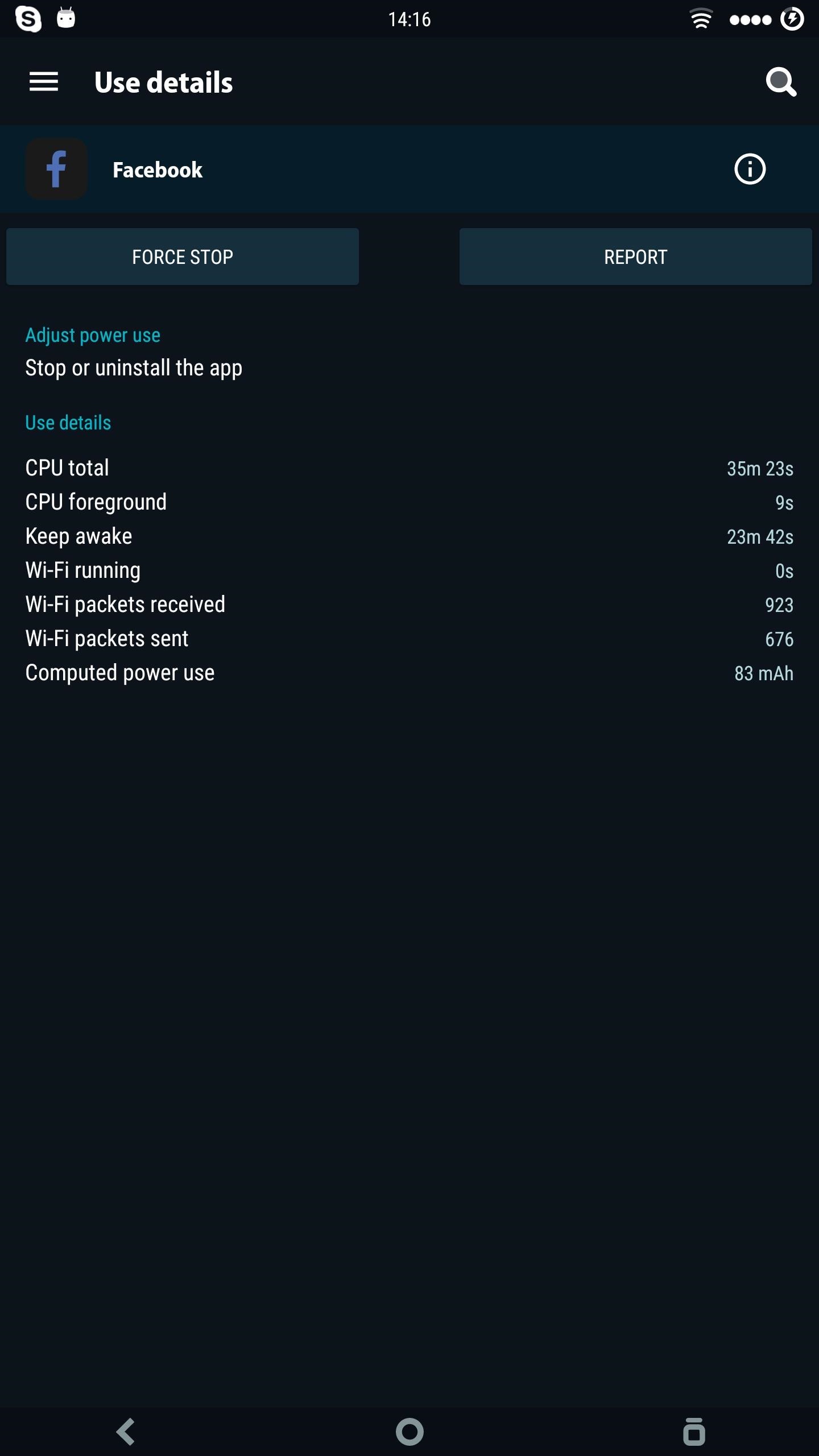
Facebook and Facebook Messenger's CPU usage and battery drain are off the charts.
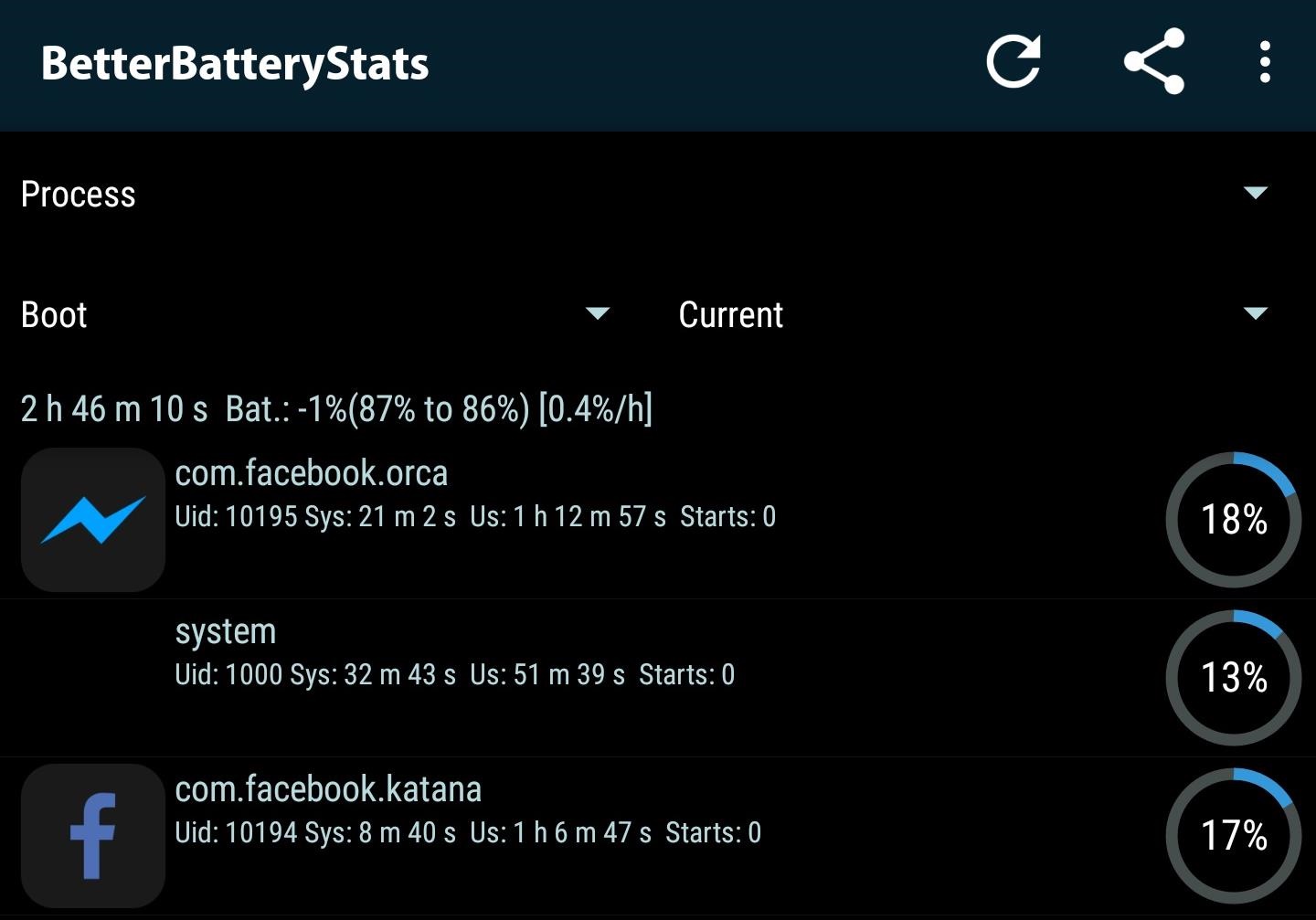
I'm not sure what sort of black magic Facebook used to hide Messenger's name from Android's battery menu and its list of juice-sucking apps, but that doesn't deter us from figuring out who's to blame. Using BetterBatteryStats, it's very clear that Facebook and Facebook Messenger are the real culprits, as both appear at the top of all CPU and battery usage stats.
Just take a look at those crazy system and usage times—all this from two apps which haven't even been launched since the update. The prolonged CPU usage translates into heat, and heat added to the high frequencies means extreme throttling on your phone, which is the reason why it's so slow and laggy. Your expensive device now has only one good use: A hand warmer!

The Solution

Well, the solution is obvious—simply uninstall Facebook and Facebook Messenger until the company gets its shit together. If Facebook and Messenger came preinstalled on your device as bloatware, you can uninstall all updates or disable the apps by heading to Settings -> Apps. You can also uninstall the apps straight from the Google Play Store, but be sure to disable automatic updates from the drop-down menu on the app's Play Store page as well.
Alternatively, you can try force-stopping the apps by heading to the Apps menu in Settings, then selecting Facebook and Facebook Messenger, and tapping the "Force Stop" button at the top of the screen. This will make the apps stop running in the background for at least a little while, but the next time you open Facebook or get a new message, the overheating and battery draining will start right back up.
Let us know if you've experienced these issues on your device, and if the solution worked. Feel free to share any thoughts or comments in the section below.

Make Sure You Never Lose Your Bluetooth Headphones Again

With smartphone makers ditching the headphone jack in the hopes of a truly wireless future, we're having to rely on Bluetooth devices like earbuds and headphones more and more. But the downside here is that these devices aren't physically connected to your phone in any way, which makes it way too easy to leave an important accessory behind.
Thankfully, there's an easy way around this problem. By using the Android automation app MacroDroid, you can make sure that your phone always notifies you when you leave your headphones behind.

Step 1Install MacroDroid

First up, you'll need to install MacroDroid if you haven't already done so. It's a great app with tons of uses, but even this one simple feature makes it more than worth a download.

Step 2Create a Macro & Add a Trigger

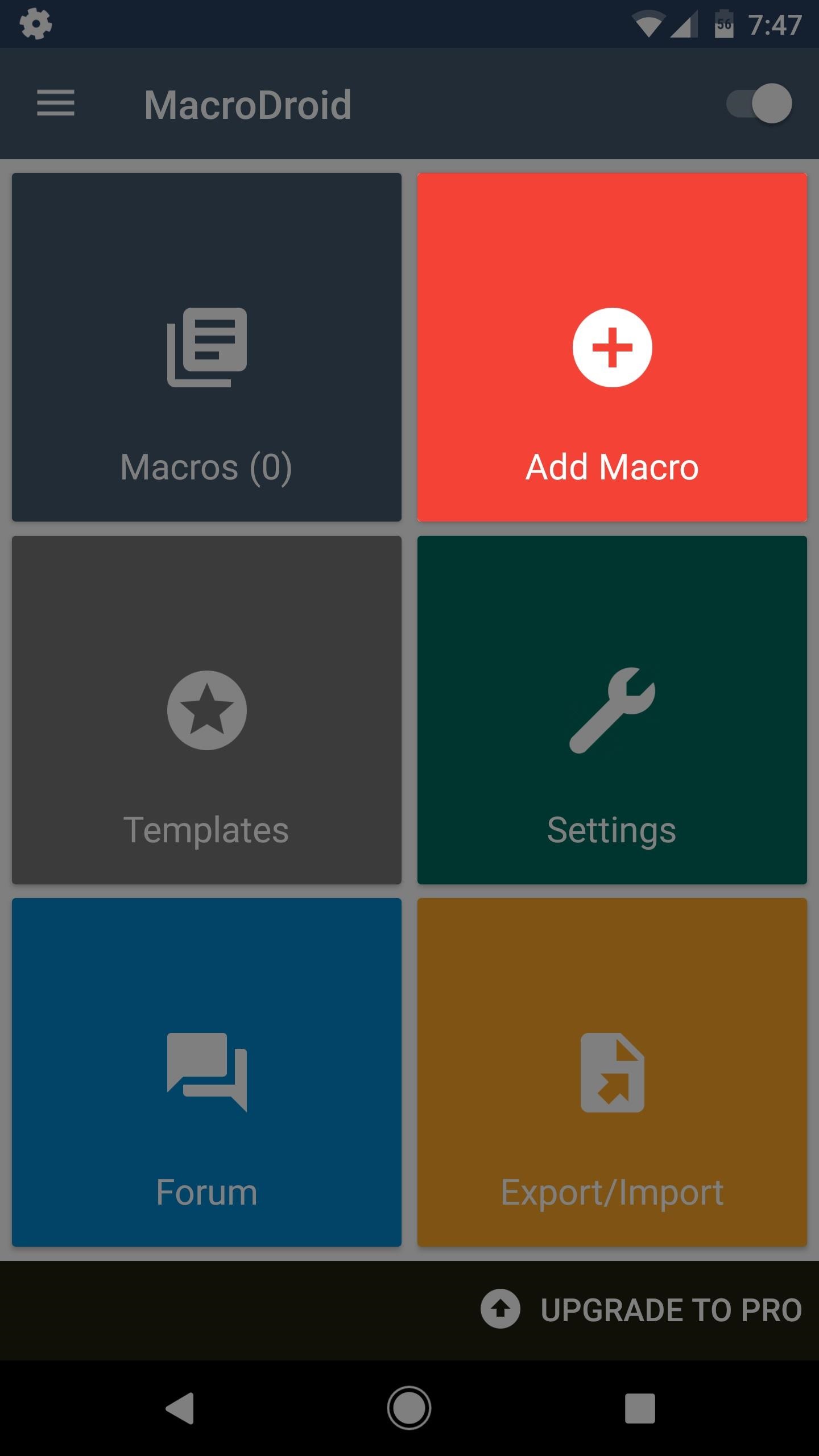
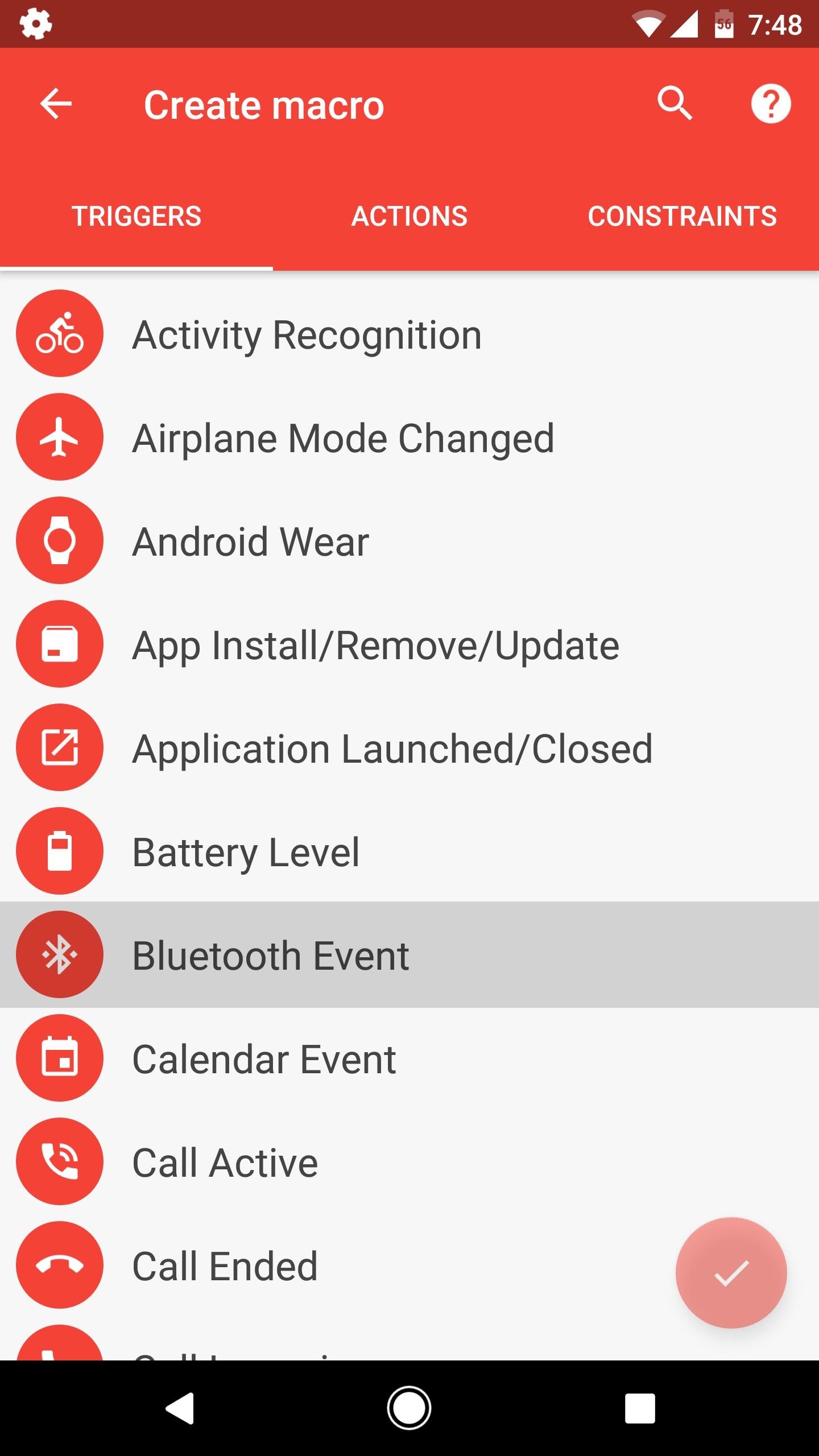
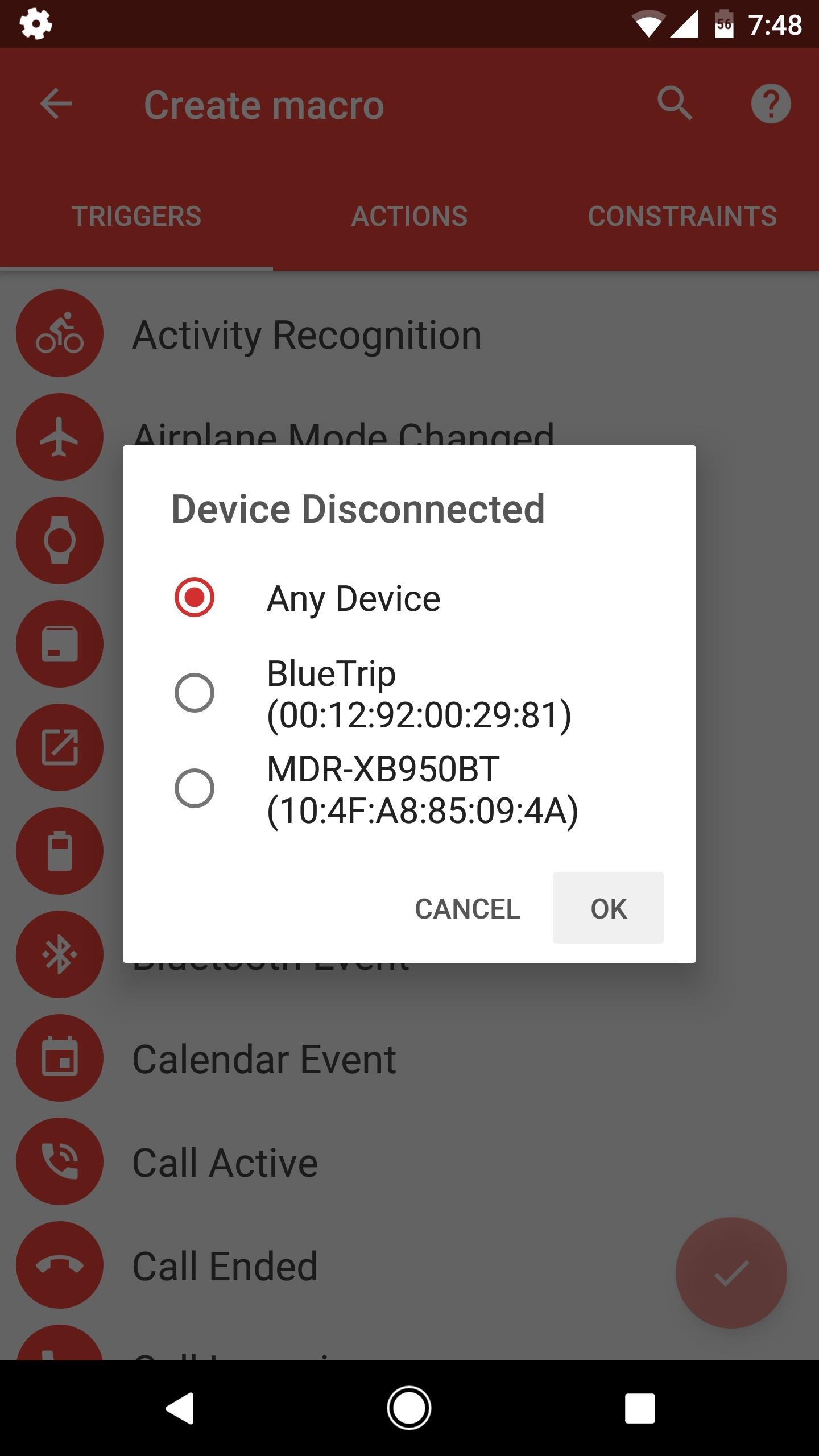
Open MacroDroid and tap "Add Macro." Next, from the Triggers tab, scroll down a bit and select "Bluetooth Event."
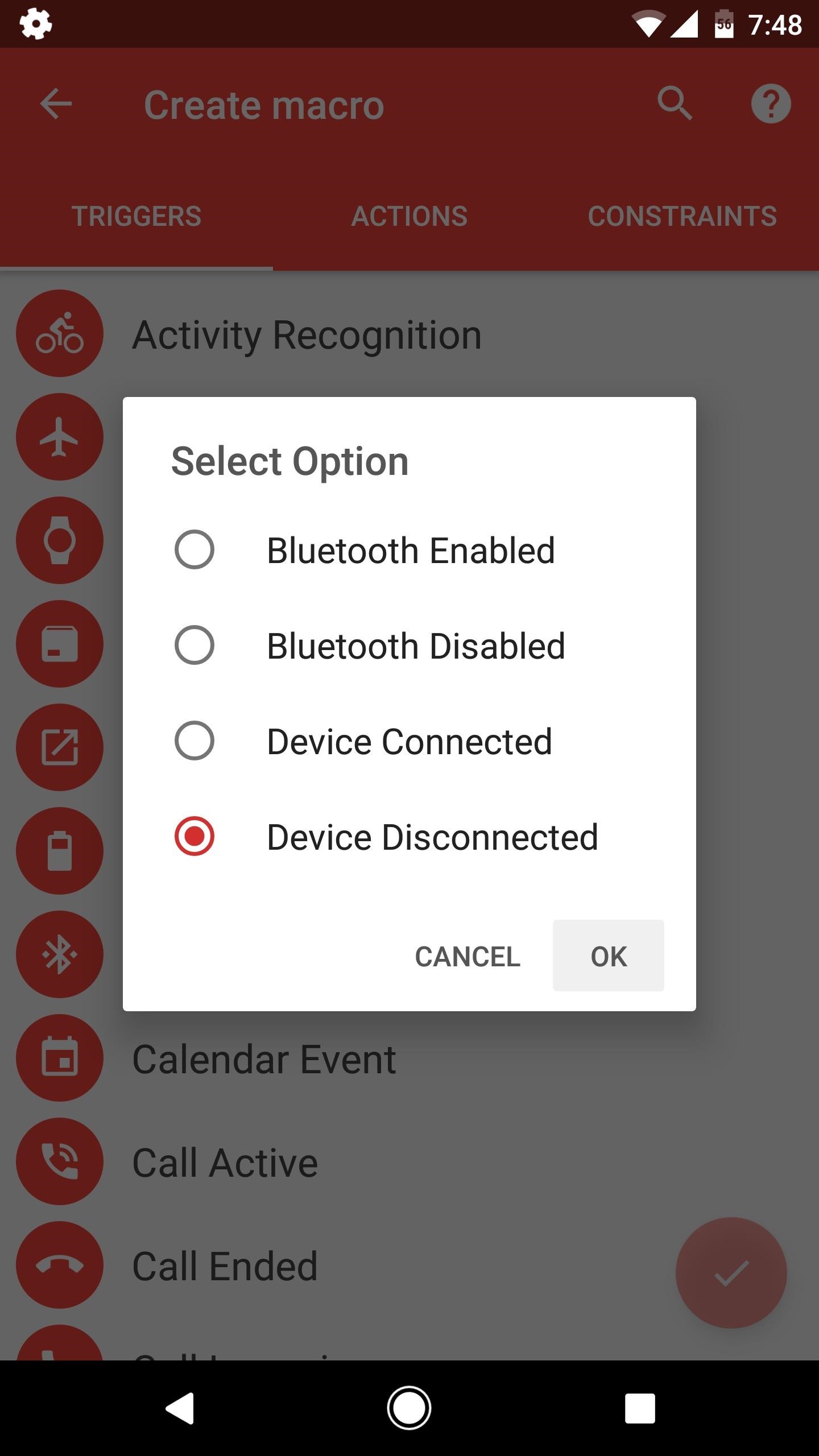
After that, select "Device Disconnected" from the popup. Next up, you'll have a choice: Either select one of your previously paired Bluetooth devices if you only want this functionality for a particular pair of headphones, or select "Any Device" if you'd like to be notified whenever any Bluetooth device gets left behind.

Step 3Add an Action

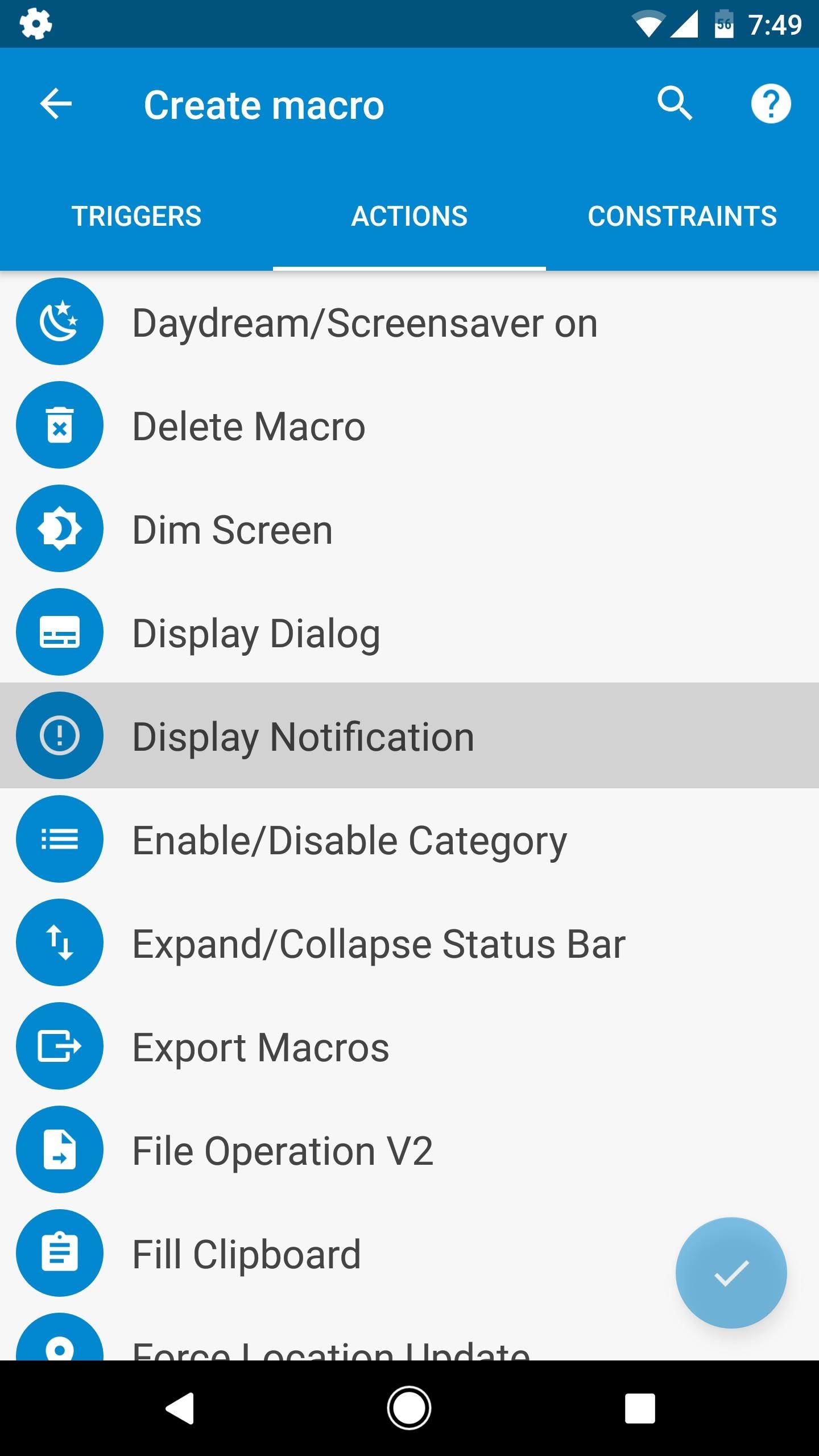
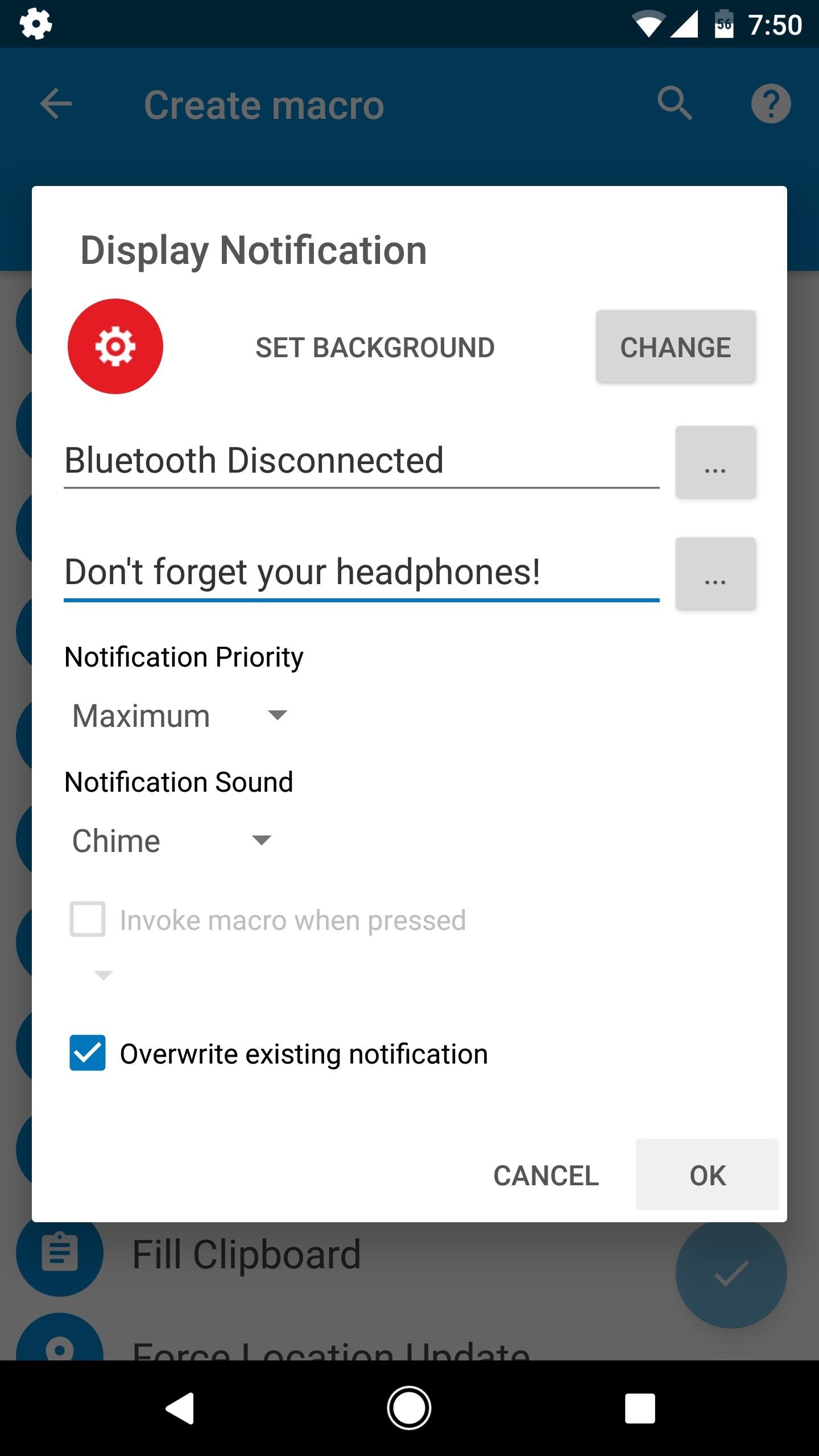
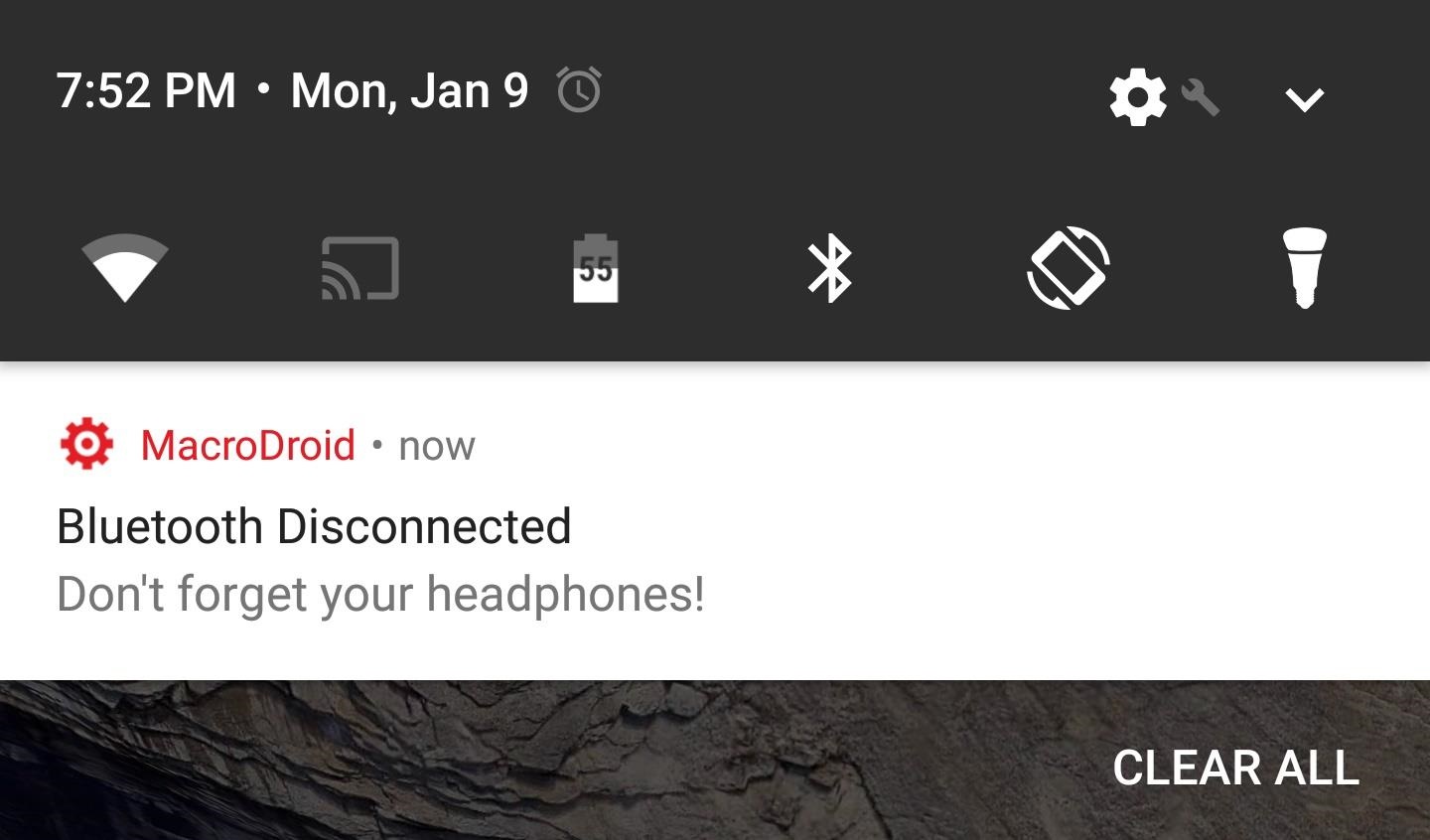
Select the Actions tab, then scroll down and choose "Display Notification" from the list. After that, type "Bluetooth Disconnected" into the top field, then write a message like Don't forget your headphones in the second field. This is the text that will be displayed on a notification when you leave your headphones behind.
Beyond that, set the Notification Priority drop-down menu to "Maximum," then choose a nice and loud ringtone as the Notification Sound. Finally, tick the box next to "Overwrite existing notification," then press "OK."

Step 4Save Your Work

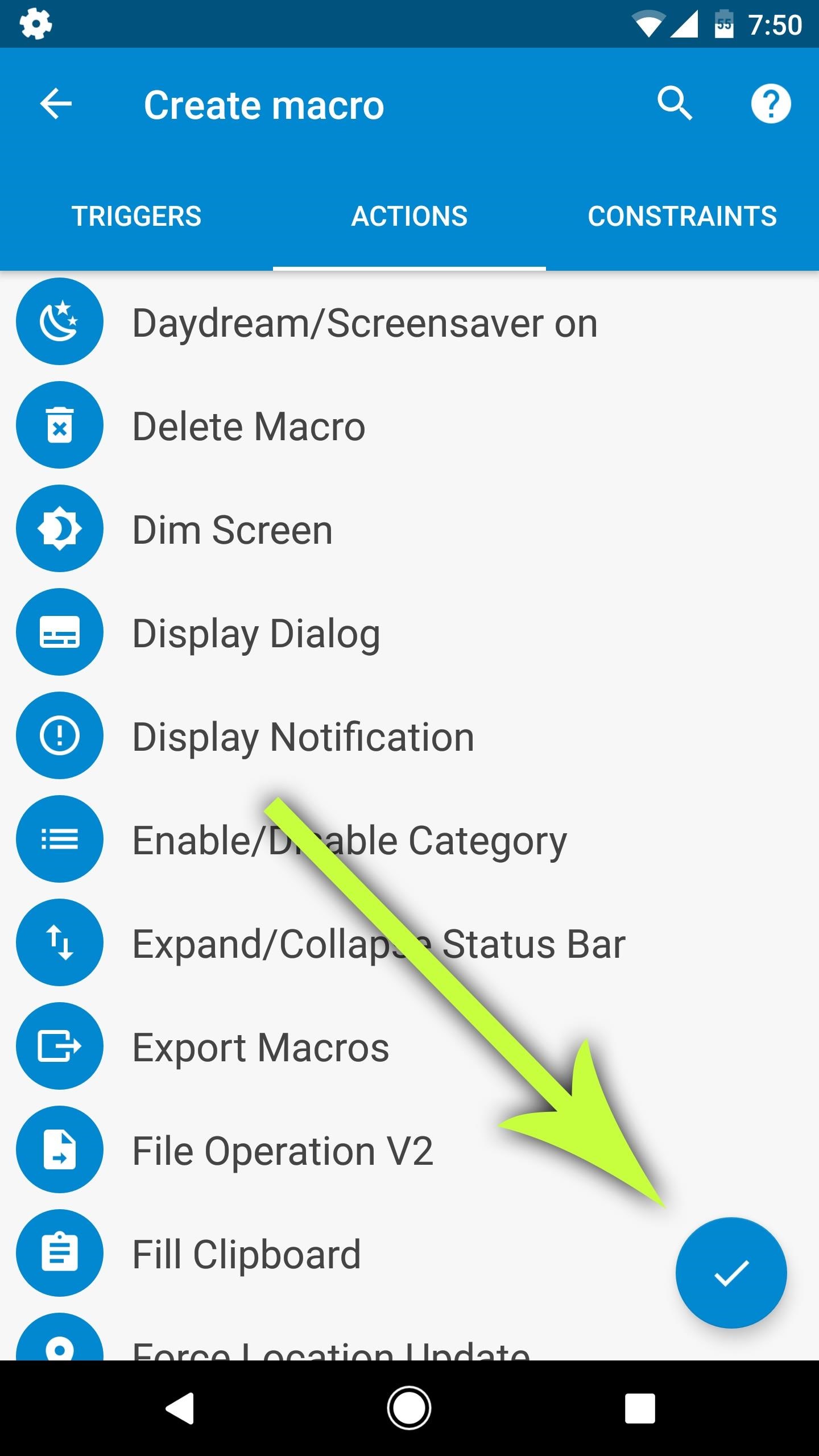
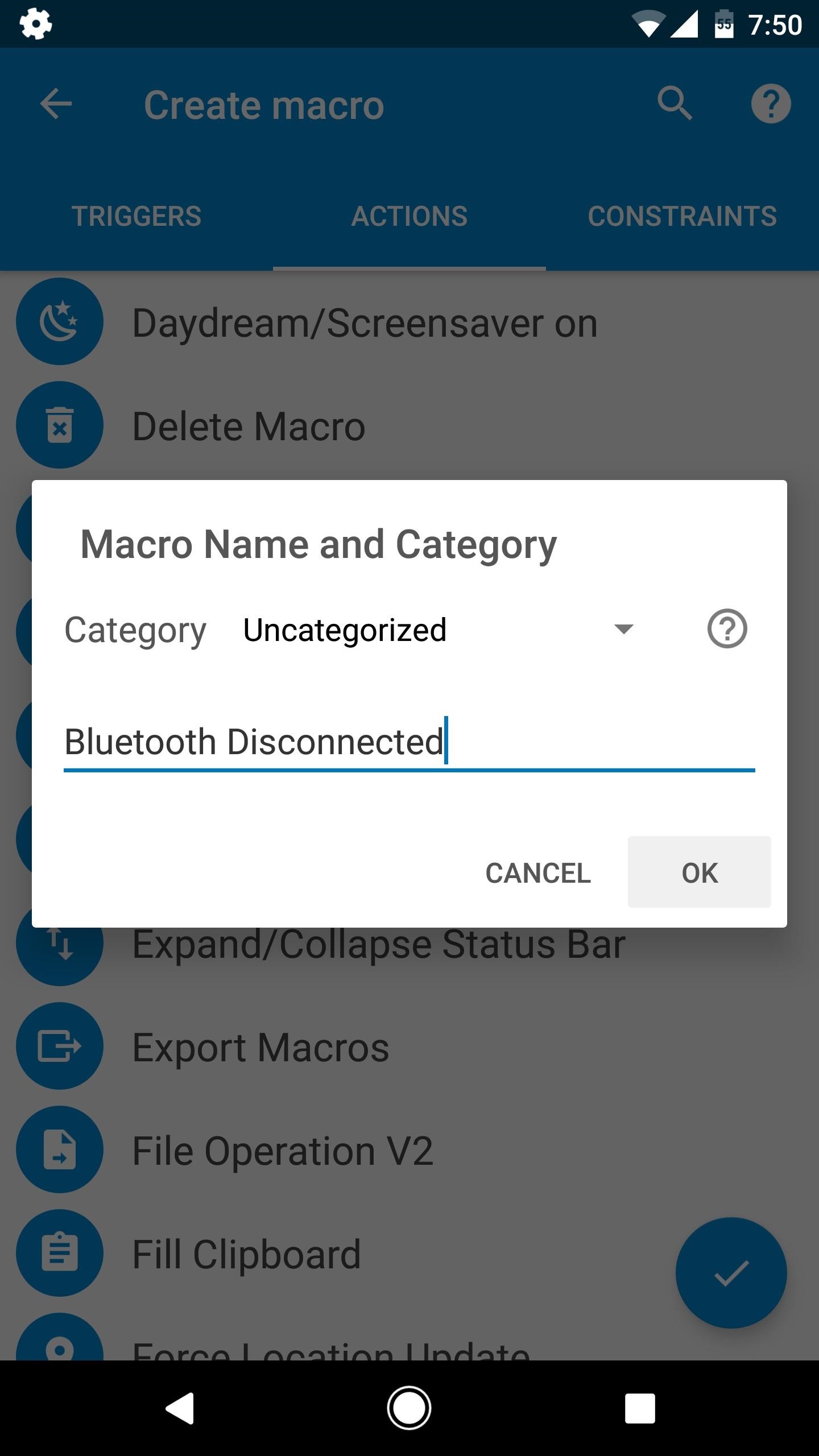
When you're done with that, tap the check mark near the bottom-right corner, then type "Bluetooth Disconnected" into the field on the popup. When you're done there, just tap "OK," and your new headphone-saving automation macro will be finished.

Step 5Never Lose Your Bluetooth Headphones Again

From now on, whenever you leave your Bluetooth headphones behind, you'll get a notification as soon as you get out of range. This will also happen when you purposefully disconnect your headphones, but that's a minor byproduct of your new macro. Bottom line, your phone will beep to give you a gentle reminder whenever you leave your headphones behind, so you don't have to worry about losing expensive accessories anymore.

Keep Android's Notification Tray Clean & Clear with a Centralized Hub

Android's notification system is quite robust, especially now that Google added bundled notifications and quick reply features to Android 7.0 Nougat. However, things can still get quite cluttered when you have several unread messages, which fills your status bar with icons and makes your notification tray take up half of the screen by itself.
To help you keep things organized, developer Shashwat Pradhan created an app that will bundle all of your notifications into one clean and simple card. This card will still show you the apps you've missed notifications from, and when you tap it, it'll take you to a sortable list of your notification history. It's an intuitive interface, so if you like to keep things clean and tidy, this one's for you.

Step 1Install Notification Hub

First up, head to the Google Play Store and install Notification Hub, which is the app that will manage your notifications with a cleaner interface.

Step 2Select Apps

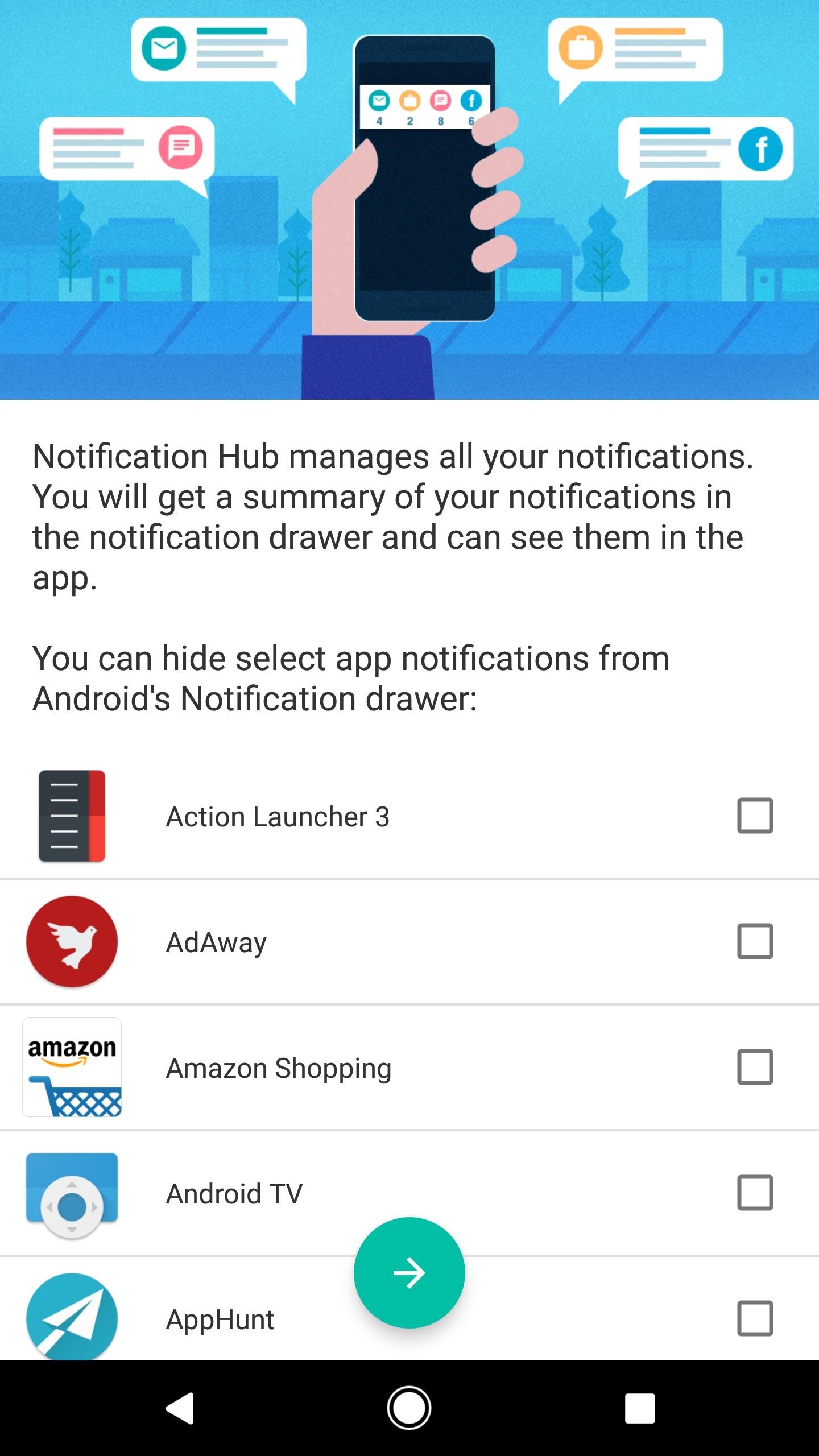
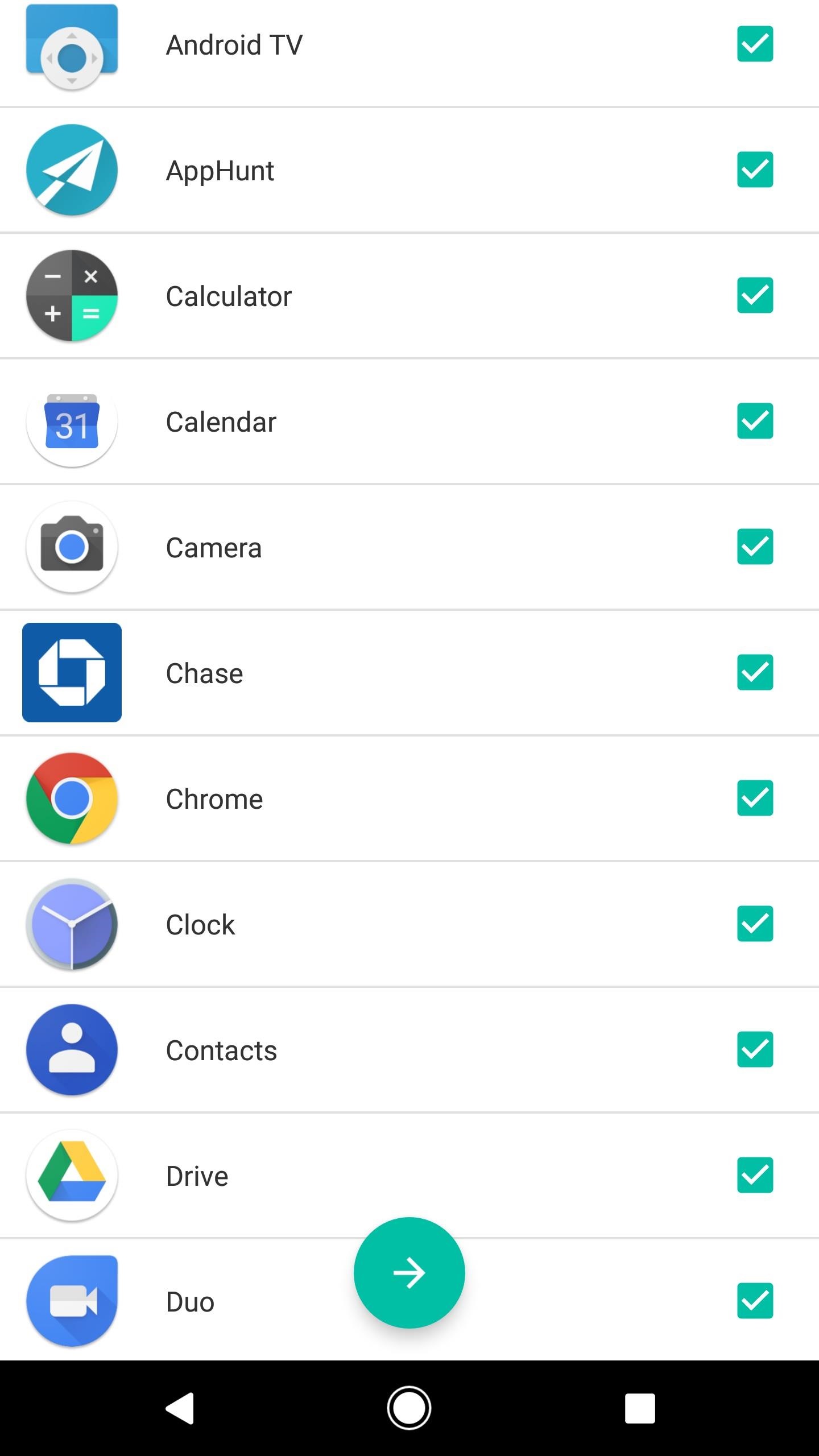
When you first launch Notification Hub, you'll be presented with a list of all your installed apps. When you select apps here, their notifications will be bundled together in a single, clean interface. So go through the list and tick the boxes next to apps you would like to get this functionality for, then press the forward-arrow button at the bottom of the screen.

Step 3Grant Permissions

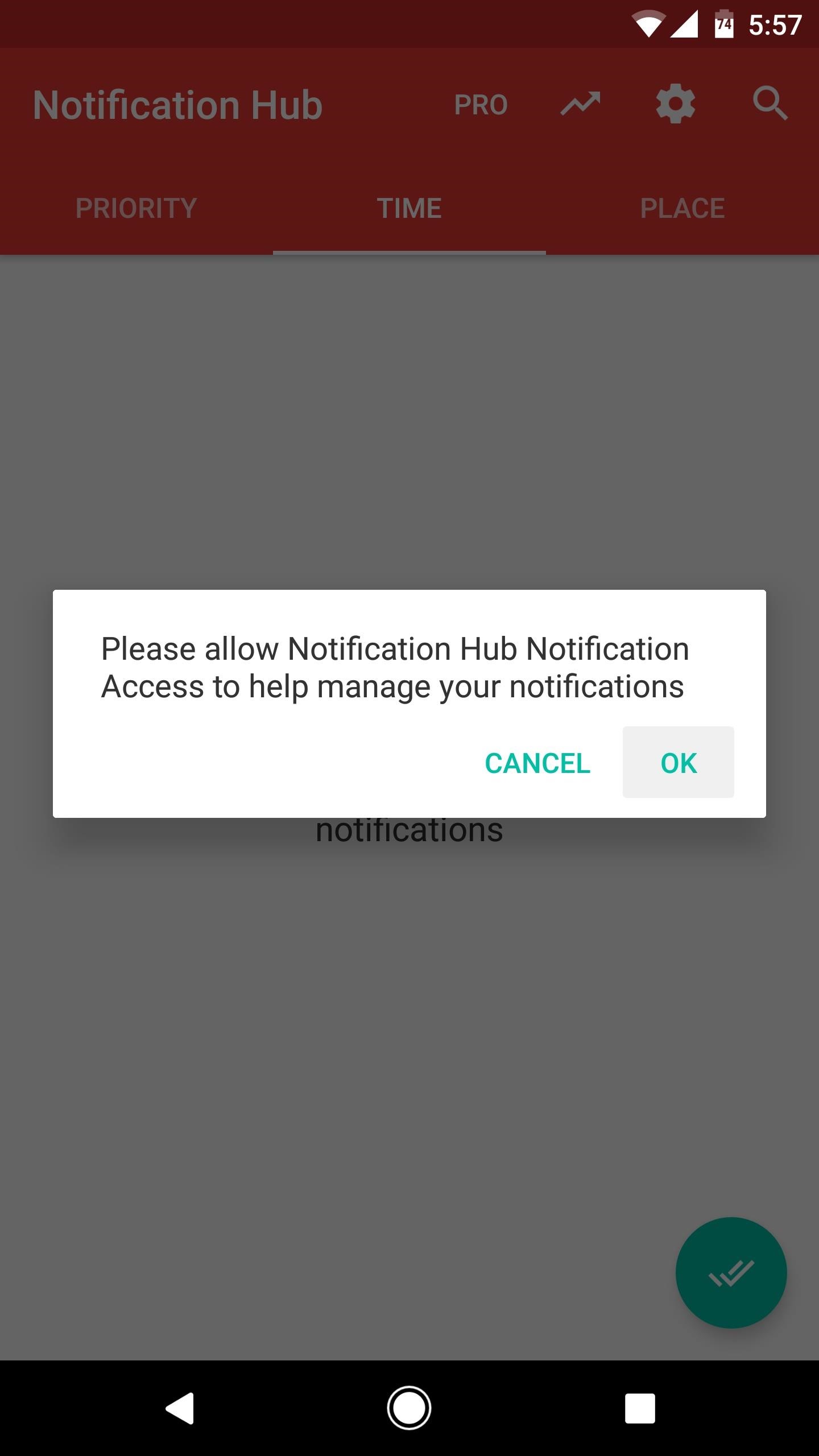
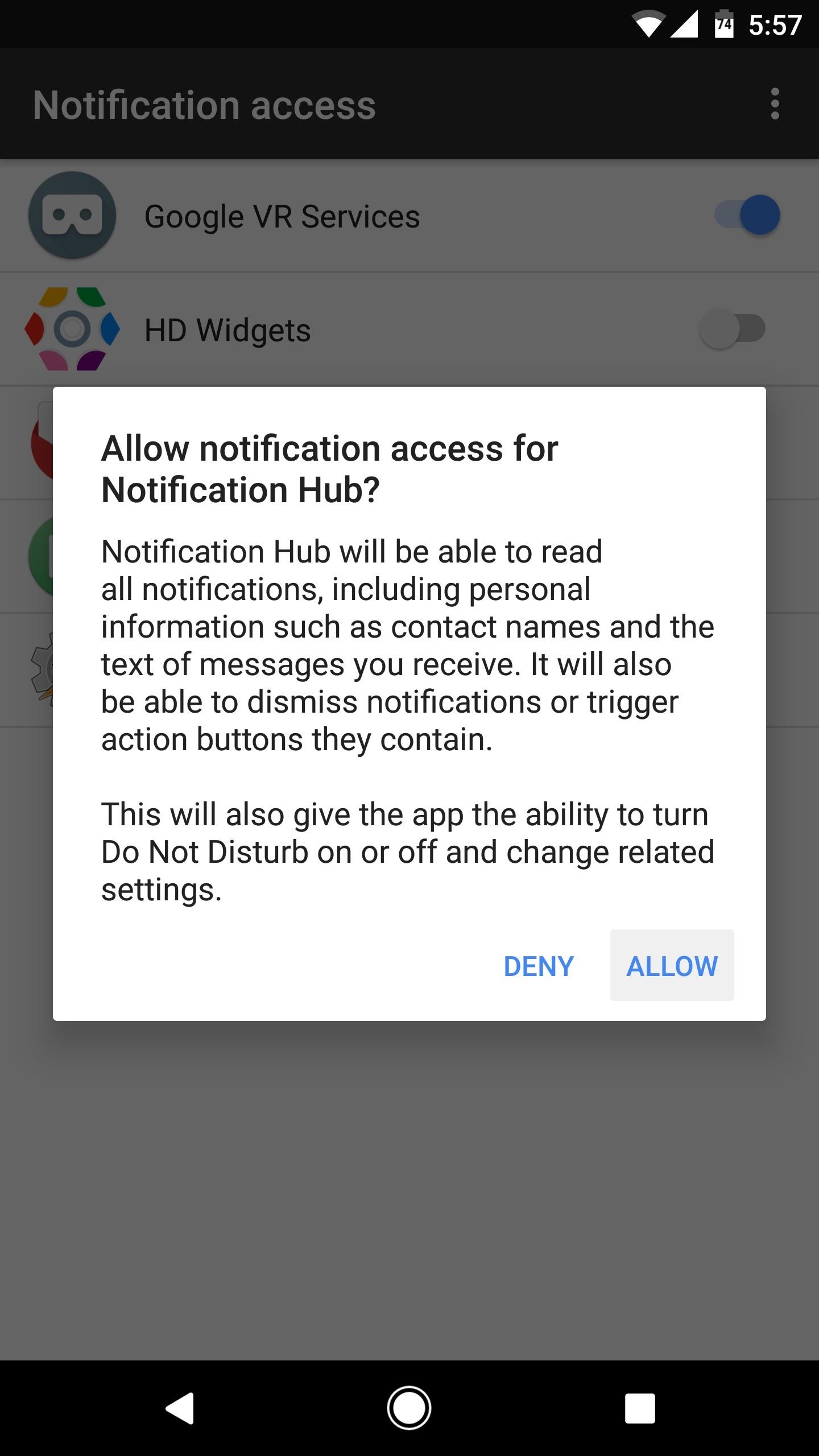
Notification Hub will ask for permission to access your notifications. So press "OK" on this popup, then toggle the switch next to the Notification Hub entry on the following screen and tap "Allow."
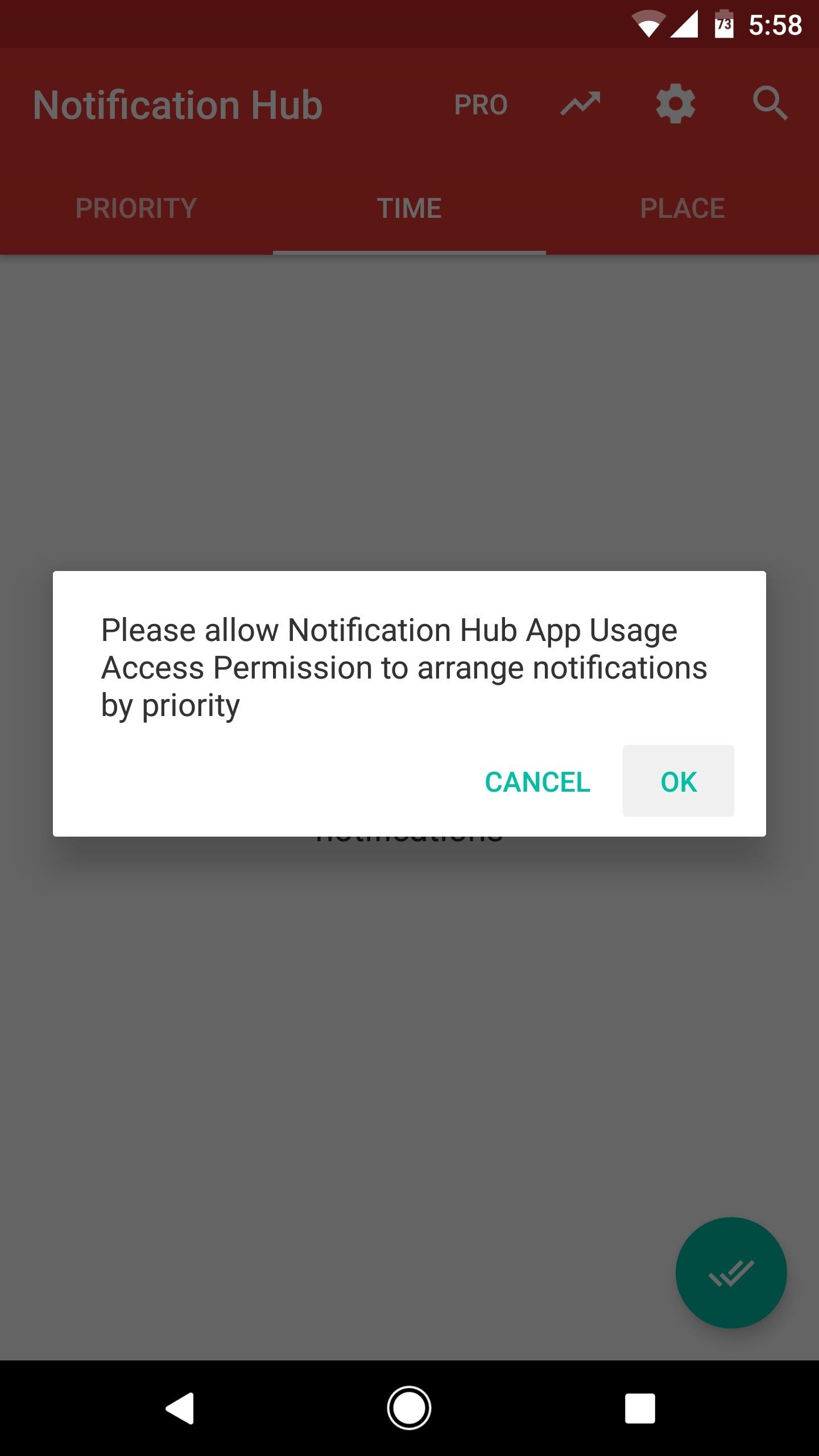
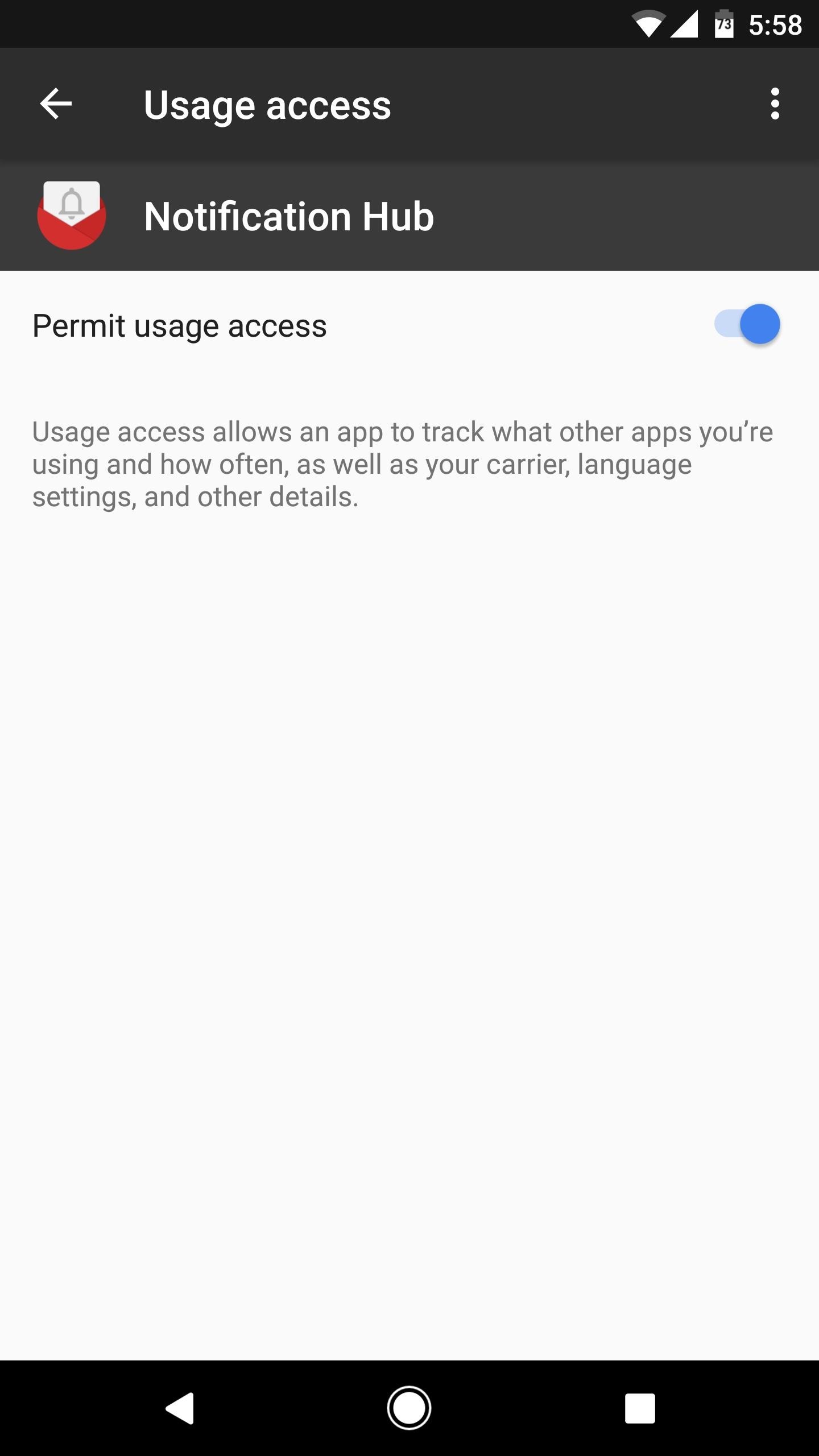
Next, tap your back button to head back to the app. From here, you'll be prompted to grant usage access, which allows Notification Hub to organize your notifications. So tap "OK" on this popup, then select Notification Hub on the following menu, and enable the usage access switch.

Step 4Enjoy a Cleaner Notification Hub

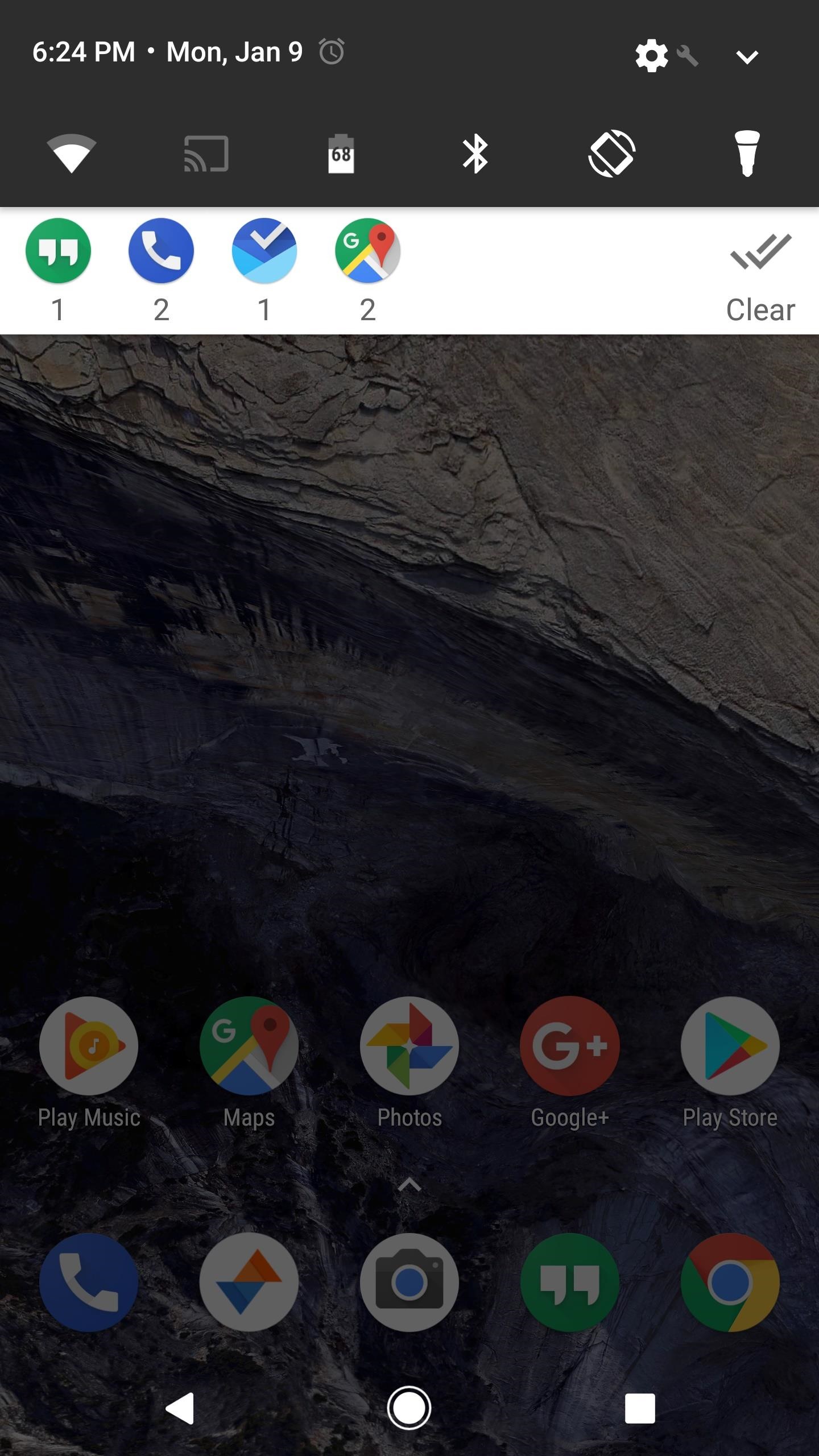
With everything set up, your notification tray will always be neat and tidy from now on. When you receive a notification from any app you selected in Step 2, it'll appear as an icon in a single notification card from Notification Hub. Directly beneath that, there's a number that tells you how many messages you've missed from that particular app. But the kicker here is that, even when you get multiple notifications from multiple apps, they'll all show up bundled together on this same card.
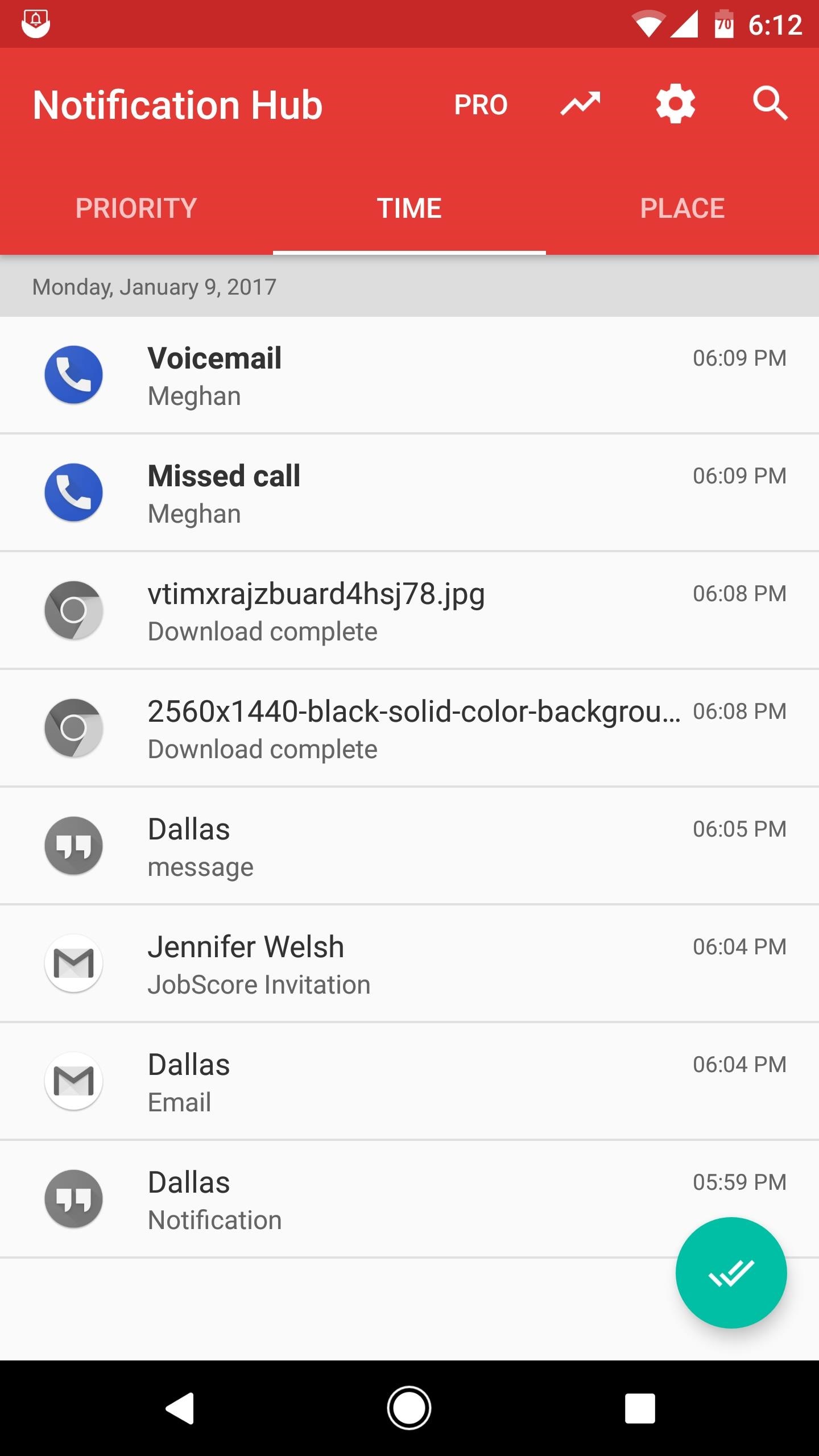
Then, when you tap this notification card, you'll be taken to the Notification Hub app. From here, you'll see a history of all your notifications, listed by the time they were posted (you can sort by "Priority" here as well, but note that the "Place" sort method requires an in-app purchase of $3.49). If you tap one of these notifications, you'll be taken directly to the app that posted it, so it's a centralized hub for all your notification needs.
Cover image and screenshots by Dallas Thomas/Gadget Hacks

BUSET... murah banget cuma 700ribuan perbulan (info dari bli bli)

Samsung Galaxy Note 5 Smartphone - Pink [LTE - 32 GB]

Brand: Samsung
| Garansi: Garansi Resmi Samsun... info
|  BARU DI BLIBLI.COM

Rp 8,499,000

CICILAN 0%
Blibli Rewards: 4,250 poin
Cicilan 0% - 6 bln
Rp 1,416,500/bulan
Cicilan 0% - 12 bln
Rp 708,250/bulan
 

Extra diskon 7% setiap hari Lihat Detil
Khusus pengguna kartu kredit Standard Chartered Visa Platinum
Extra diskon 5% setiap hari Lihat Detil
Khusus pengguna kartu kredit Standard Chartered selain Visa Platinum
  • Garansi Resmi Samsung 1 Tahun
  • OS : Android OS, v5.1.1 ( Lollipop )
  • CPU : Quad-core 1.5 GHz Cortex-A53 & Quad-core 2.1 GHz Cortex-A57
  • Memori : 32 GB dan 4 GB RAM
  • Kamera : 16 MP dan 5 MP
  • Layar : 5.7 Inch Quad HD Super AMOLED

Deskripsi Produk
Samsung Galaxy Note 5 Smartphone - Pink [LTE - 32 GB]

Samsung Galaxy Note 5 Smartphone - Pink [LTE - 32 GB] merupakan smartphone dengan ukuran layar 5.7 Inch dengan sistem operasi Android 5.1 (Lollipop) dan kapasitas penyimpan 32 GB. Selain itu, smartphone ini dilengkapi dengan S Pen yang memudahkan untuk menuliskan pengingat, daftar dan jadwal. Smartphone ini didukung oleh Samsung Exynos 7420 Octa-core prosesor 64-bit dan dikombinasikan dengan 4 GB RAM.
SKU Number: BLS-25480-00031
Product Code: MTA-0226628

Spesifikasi
Samsung Galaxy Note 5 Smartphone - Pink [LTE - 32 GB]

  • Brand
    • Samsung
  • Kamera
    • Kamera (utama) 16 MP Kamera (depan) 5 MP
  • Kapasitas Baterai
    • Non-removable Li-Po 3000 mAh battery
  • Memory
    • 4 GB RAM
  • Operating System
    • OS Android v 5.0 ( Lollipop )
  • Sim Card
    • sim Nano-SIM
  • Ukuran Layar
    • 5.7 Inch (Tipe Display Super AMOLED capacitive touchscreen)
  • Memori Internal
    • 32 GB
  • Slot Memori Eksternal
    • -
  • Chipset
    • Exynos 7420
... selengkapnya

Ulasan Produk
Samsung Galaxy Note 5 Smartphone - Pink [LTE - 32 GB]

5 dari 5 bintang 1 ulasan
5 Bintang
1 ulasan
4 Bintang
0 ulasan
3 Bintang
0 ulasan
2 Bintang
0 ulasan
1 Bintang
0 ulasan

Ulas produk ini!

Dapatkan 200 poin Blibli Rewards jika Anda sudah membeli produk ini
Beri produk ini
0 bintang
Ulasan Terbaru
oleh Ronald, 07 May 2016
Smartphone dgn Spek Tinggi, Berkualitas & Murah!
Kalau mau cari Smartphone murah yang berkualitas baik dengan spesifikasi yang mumpuni, mungkin pilihannya bisa jatuh pada produk ini. Selain didukung dengan garansi resmi yang terjamin, produk ini juga didukung dengan purna jual dari merek yang cukup terpercaya. So.. tunggu apalagi gaess... Segera beli produk ini jika anda butuh Smartphone yang MURAH, tapi BAGUS !
Apakah ulasan ini bermanfaat?

Thursday, 12 January 2017

OOT (Out Of Topic) Pro Kontra lambang PALU ARIT

Selamat siang sahabat pntar semuanya, kal ini ane mau ngebahas dikit tentang berita terkini masalah palu arit. yah... tak lain adalah isu isu komunisme dalam pecahan uang baru (rupiah baru) yang diikeluarkan oleh BI. KATANYA sih, ada logo palu ariitnya. jujur aja siuii.. ane belum pernah megang lembaran uangnya untuk membuktikan rumornya. yah, apa boleh baut, ane cuma bisa ambiil referensi dari berita-berita yang di dapat di internet. salah satunya berita in

Suara.com - ‎Kapolda Metro Jaya Inspektur Jenderal Mochamad Iriawan menyayangkan beredarnya video ceramah pimpinan Front Pembela Islam Habib Rizieq ketika menyebut uang rupiah yang baru dicetak Bank Indonesia berlogo palu arit. Padahal, kata dia, BI sudah membantah ada logo komunisme dalam uang baru.

"Sudah dijelaskan. Jadi ada laporan baru berkaitan dengan penyebutan mata uang baru berlambang palu arit. Padahal BI sudah menyampaikan ada sistem baru pengamanan hologram di uang baru. Namanya rectoverso. Jadi dua mata sisi itu berbeda, tapi apabila diterawang ada lambang BI," kata Iriawan di Polda Metro Jaya, Rabu (11/1/2017).

Beredarnya video ceramah Rizieq di media sosial kemudian berbuntut panjang. Kelompok masyarakat melaporkannya ke polisi dengan tuduhan penyebaran berita bohong dan kebencian berbau SARA.

"Tapi karena ada masyarakat lapor, tentu polisi harus menanganinya dengan melakukan penyelidikan," katanya.

Dalam laporan yang dibuat Jaringan Intelektual Muda Anti Fitnah pada Minggu (8/1/2017), Rizieq disangkakan melanggar Pasal 28 ayat 2 Jo Pasal 45 ayat 2 Undang-undang Republik Indonesia Nomor 19 Tahun 2016 atas Perubahan UU Nomor 11 Tahun 2008 tentang ITE.

Untuk mengusut kasus tersebut, penyidik akan meminta pendapat ahli sebelum menentukan status Rizieq dalam gelar perkara.

"Kalau pelaporan kita kenakan pasal 28 ayat 1 ITE itu ujaran kebencian dan kebohongan. Tapi nanti kita melengkapi bukti itu. Tentu kita melakukan gelar perkara. Itu domainnya saksi ahli," katanya.

 agar lebih enak, coba ane liat lat referensii llainnya


untuk iide desainnya sh menurut ane ya keren banget sob... semua mata pecahan kertas memiliki karakteristik desain yang sama. ini menunjukkan bahsa, ya memang... mata uang indonesia semakin memilkii karakter (desain), di samping itu. untuk gambar pahlawan juga di tunjukkan pahlawan-pahlawan yang jarang di kenal, sehingga iini menunjukkan bahwa kit juga bisa mengenal pahlawan pahlawan perjuangan RI dar selembaran mata uang, yang belum tentu d dapat dar lmu lainnya.

ok, kembal ke topik.
berkut adalah vdeo dari (entah yang pdato bapak siapa namanya) yutup yang diunggah oleh penggunanya
Nitip salam ya buat bapak in: "saya seorang muslim pak, tapi saya ga pernah (mencoba) menjadi se sangar bapak, yang mencampuri urusan kenegaraan sepert yang bapak lakukan, maaf kalo saya lancang. tapi apakah FPI itu kepanjangannya FORUM PEMBELA ISLAM? ya sudah, agama kiita aja pak yang bapak perjuangkan. jangan melebar ke negaraan dong. tu kan udah ada kewajibannya masng masng bukan?"
nah, kalo gtu kta lhat referensi lainnya yuk

di gambar tumbnailnya ya bener gan... ada gambar palu aritnya O.O
ah, ga puas ane gan, coba ah.. cari referens lannya bar enggak salah paham atau malah berfkran nyasar


nah... yang iinii nihhh, masuk akal banget :D
coba yuk referensi lan

ehh, dapet judulnya aja udah sangar nh video :D

ini referensi lain

Cerita Sebenarnya Geger Simbol `Palu Arit` di Uang Rp100 Ribu

Reporter : Arie Dwi Budiawati | Senin, 14 November 2016 10:43
Gambar Rectoverso Yang Dikira Logo Palu Arit. (Foto: Bank Indonesia)

Dream - Media sosial beberap ahari dihebohkan dengan dugaan adanya simbol terlarang di uang kertas pecahan Rp100 ribu. Mereka beranggapan ada gambar palu arit yang merupakan simbol dari Partai Komunis Indonesia (PKI).
Foto yang diperbincangkan masyarakat ini diunggah oleh pengguna akun Facebook yang bernama Lukman Mase. Dilansir dari akun Facebooknya, Senin 14 November 2016, Lukman mengatakan logo Bank Indonesia telah ditukar dengan logo komunis dan menyebut Indonesia kini diperintah oleh PKI.
" MATA DUIT INDONESIA KINI TELAH DI TUKAR LOGO NYA
LOGO BI di Tukar Logo Palu ari Bermakna indonesia sekarang telah di perintah oleh PKI pahaman Komunis kenapa cakap begitu karena mata DUIT indonesia sekarang sudah jelas2 LOGO PKI
INDONESIA DALAM BAHAYA BESAR SEKARANG INI , BRAVO TNI BERSATU SAMA RAKYAT MENJAGA NKRI HARGA MATI. LBM," tulis dia dalam keterangan fotonya.

Penjelasan BI

Mendengar kabar menghebohkan tersebut, Bank Indonesia (BI) langsung angkat bicara. Bank Sentral di tanah air itu menegaskan simbol yang menggegerkan dunia maya ini bukanlah simbol PKI.
Menurut Direktur Departemen Komunikasi BI, Arbonas Hutabarat gambar itu adalah rectoverso, yaitu gambar saling isi. Maksudnya, Jika diterawang, Rectoverso pada uang Rupiah akan membentuk lambang BI (singkatan dari Bank Indonesia). Rectoverso tidak dirancang untuk membentuk atau dimaknai sebagai gambar atau simbol lain, selain lambang BI.

Sudah Dipakai Sejak 1995

Dalam penjelasannya, Arbonas mengatakan salah satu unsur pengaman yang ada dalam uang Rupiah adalah gambar saling isi atau Rectoverso. Unsur pengaman ini telah digunakan oleh Bank Indonesia sejak tahun 1995.
Rectoverso adalah suatu teknik cetak khusus pada uang kertas yang membuat sebuah gambar berada di posisi yang sama dan saling membelakangi di bagian depan dan belakang.
Apabila dilihat tanpa diterawang, gambar akan terlihat seperti ornamen yang tidak beraturan. Namun apabila diterawang, Rectoverso akan membentuk sebuah gambar yang utuh.

Banyak Dipakai Negara Lain

Selain pada uang kertas Rupiah, unsur pengaman Rectoverso juga digunakan oleh negara-negara lain seperti pada uang kertas Malaysia Ringgit (membentuk ornamen bunga), dan uang kertas Euro (membentuk ornamen nilai nominal).
Selain Rectoverso, beberapa unsur pengaman lain yang terdapat dalam uang Rupiah antara lain adalah tanda air, benang pengaman, tulisan mikro, tinta berubah warna, dan gambar tersembunyi.
Dengan memahami unsur-unsur keamanan dalam uang, masyarakat diharapkan dapat lebih mudah mengenali keaslian Rupiah dan tidak mudah terprovokasi oleh informasi yang belum jelas sumber beritanya.(Sah)


ini versi gue, (ddapet darii referensi referensi di atas)


mudah-mudahan kaga jadi fitnah ya gan, karena salah satu tanda kamat adalah fitnah

bdw, yuk liat pk tu apa


ok, sekian dari ane sob... semoga jadi pintar yaa :*

Tuesday, 10 January 2017

Kode Rahasia Android Terlengkap


86 Kode rahasia Android terlengkap. Salam semuanya untuk sobat idesat.com, pada kesempatan ini ada satu artikel yang dapat membantu dan mungkin sedang dicari juga membutuhkannya, ada apa ya? nih mau tahu ya, Anda mempunyai Os Smartphone paling canggih di beberapa-tahun ini dan sudah mendukung beberapa hal dari Internet dan media.
Smartphone besutan vendor Samsung salah satunya ada kode-kode tertentu yang tersembunyi, mungkin ada sobat idesat.com belum mengetahui kode dibalik Smartphone Os android itu.

Kode rahasia Android terlengkap

Kode rahasia Android

Kode-kode tersembunyi Os android 

1. Kode:*#0*#
Cek LCD, warna, vibrasi, speaker, sensor, dimming
2. Kode:*#0011#
Cek kode untuk tes service mode
3. Kode:*#197328640#
Cek kode seperti nomor 5 tapi simpel
4. Kode:*#1234#
Cek kode versi android dari perangkat.
5. Kode:*#0842#
Cek kode tes vibrasi

6. Kode:*#0228#
Cek kode sinyal dan baterai
7. Kode:*#*#4636#*#*
Cek kode phone information
8. Kode:#*#44336#*#*
Cek kode pda, phone, csc, changelist number
9. Kode:**9998*5282#
Cek kode Setting Java Server
10. Kode:*#9999#0#
Cek kode Lcd

11. Kode:*#232331#
Cek kode bluetooth
12. Kode:*#232338#
Cek kode Wifi
13· Kode:*#232339#
Cek kode wifi sama nomor 12
14· Kode:*#0842#
Cek kode vibra motor
15·Kode:*#0673#
Cek kode audio

16· Kode:*#2263#
Cek kode rf selection
17· Kode:*#9090#
Cek kode diagnosa konfigurasi
18· Kode:*#7284#
Cek kode usb
19· Kode*#0289#
Cek kide meldi
20· Kode:*#2663#
Cek kode tsp firmware

21·Kode:*#03#
Cek kode nad flas
22. Kode :*#7353#
Cek kode sistem melodi
23. Kode :*#0782#
Cek kode time clock test
24. Kode :*#0283#
Cek kode Audio Loopback Control
25· Kode :*#0589#
Cek kode lampu sensor

26· Kode:*#0588#
Cek kode proximity sensor
27·*#273283*255*3282*#
Data Mаkе Menu
28·*#273283*255*66328
29.*#9998*523# dan *#0523#
Menampilkan contrast
30.*#06#
untuk melihat IMEI

31.*2767*3855#
hard reset
32.*#*#7780#*#*
factory reset
33.*#*#7594#*#*
change end call/power option
34·*#0*#
General Test Mode
35·*#1234#
View SW Version PDA, CSC, MODEM)

36·*#12580*369#
SW & HW Info
37·*#0228#
ADC Reading
38·*#197328640#
Service Mode
39·*#0782#
Real Time Clock Test
40·*#32489#
Ciphering Info)

41·*#232337#
Bluetooth Address
42.*#8999*638#
Menunjukkan info network
43.*#0001#
Menunjukkan serial parameter
44.*2767*3855#
Reset handphone
45.*2767*2878#
Phone Lock

46.*#*#197328640#*#*
service mode
47.*#*#273283*255*663282*#*#*
file copy screen backup media files
48.*#*#526#*#* wlan test
49.*#*#232338#*#* shows wifi mac address
50.*#*#1472365#*#*
gps test

51.**#*#1575#*#*
another gps test
52.*#*#232331#*#*
bluetooth test
53.*#*#232337#*#
shows bluetooth device address
54.*#*#8255#*#*
gtalk service monitor
55.*#*#0283#*#*
packet loopback

56.*#*#0*#*#*
lcd test
57.*#*#0673#*#*
melody test
58.*#*#0842#*#*
device test vibration test and backlight test
59.*#*#2663#*#*
touch screen version
60.*#*#2664#*#*
touch screen test

61.*#*#0588#*#*
proximity sensor test
62.*#*#3264#*#*
ram version
63.*#*#4986*2650468#*#*
pda, phone, h/w, rfcalldate
64.*#*#1234#*#*
pda and phone
65.*#*#1111#*#*
fta sw version

66.*#*#2222#*#* fta hw version
67.*#99984357# *Help Menu
68.*#9999# Sofware version
69.*#8888# Hardware version
70.*#9998*228# baterai

71.*#9998*76#
Nomor produksi
72.*#272*imei#*
Product code)
73·*#*#8255#*#*
Device ID Android
74·*#872564#
USB Logging Control
75·*#4238378#
GCF Configuration

76·*#745#
RIL Dump Menu
77·*#0283#
Audio Loopback Control
78·*#746#
Debug Dump Menu
79·*#1575#
GPS Control Menu
80·*#3214789650#
LBS Test Mode

81·*#746#
Debug Dump Menu
82·*#9900#
System Dump Mode
83·*7465625*782*#
Configure Network Lock NSP
84·*#44336#
Sofware Version Info
85·*#7780#
Factory Reset
86·*2767*3855#
Full Factory Reset